If your landscaping company website is pulling traffic from Atlanta homeowners searching "patio installation near me" and "retaining wall contractor OTP" but your quote form sits quiet for days, the problem is rarely the traffic. After eight years designing softscape and hardscape installs across Buckhead, Decatur, Marietta, and the OTP belt, we have audited a lot of competitor sites. The same four leaks show up over and over. This post walks through each one and shows how a landscaping company website quote form CMS built for our trade fixes them - in our case, Workspace CMS, the platform our landscaping website designer team standardized on after rebuilding our own funnel.
The short list:
- Portfolio photos are phone screenshots dumped into a grid, not organized by project type.
- The quote form asks for ten fields before the homeowner has decided they trust you.
- There is no clear service-area map separating Atlanta proper from the perimeter and OTP.
- There is no LocalBusiness schema, so Google has no structured reason to put you in the local 3-pack.
Below: each leak, why it costs you signed proposals, and what a fix looks like inside a managed CMS. If you would rather skip ahead and see how the admin handles all four, you can book a 20-minute walkthrough with the Workspace CMS team and bring your current site.
1. Your portfolio is a phone-camera dump, not a project-organized gallery
Open your portfolio page and ask: can a homeowner who wants a flagstone patio find three flagstone patios in under five seconds? If they have to scroll past a Bermuda lawn renovation, a Zoysia overseed, two pool surrounds, and a drainage swale to get there, the answer is no - and that homeowner is back on Google looking at the contractor below you.
In our experience, portfolio pageview share runs 38–42% of total session activity on landscape sites we have built. Homeowners are not reading your About page - they are scanning images for the project that looks like the one in their head. Every second they spend hunting is a second your competitor is one tab away.
The fix is structural, not photographic. You need a portfolio taxonomy that mirrors how Atlanta homeowners actually shop:
- Hardscape: patios, retaining walls, walkways, fire features, outdoor kitchens.
- Softscape: bed design, sod installs (Bermuda vs Zoysia vs Fescue), tree and shrub work.
- Drainage and grading: French drains, swales, regrading after a basement waterproofing job.
- Irrigation: zone design, smart controllers, drip conversions.
The Workspace CMS portfolio template ships with category-tagged galleries. Upload a project once, tag it Hardscape → Patio → Flagstone, attach the neighborhood, and the same project shows up on the right service page, the right location page, and the master portfolio grid. There is no copy-paste, no duplicate uploads, and no orphan images.
The other piece most studios skip: alt text. A 60-photo before/after gallery is 60 missing alt tags, which is 60 missed ranking opportunities and a real accessibility problem. Workspace CMS includes AI Image Alt-Tag Suggestions tuned to your brand voice, so the platform reads the image, proposes "Flagstone patio with bluestone border, Druid Hills install, August 2025," and your editor approves or tweaks. That alone has moved gallery pages from invisible to indexed on every site we have migrated.
2. Your quote form asks for too much, too early
We pulled our own form analytics last spring and found that requiring a phone number on our patio quote form dropped completions by 31% versus an email-only first step. Homeowners researching a $14,000 hardscape install at 10 p.m. on a Tuesday do not want to hand over a phone number yet. They want to ask a question and see if you reply like a human.
The landscaping company website quote form CMS pattern that converts is a two-step flow:
- Step one: project type, ZIP, email, one free-text "tell us about your project" field. Four fields, twenty seconds.
- Step two (after submit): optional phone, budget range, timeline, photo upload. Now they have committed, so they fill more in.
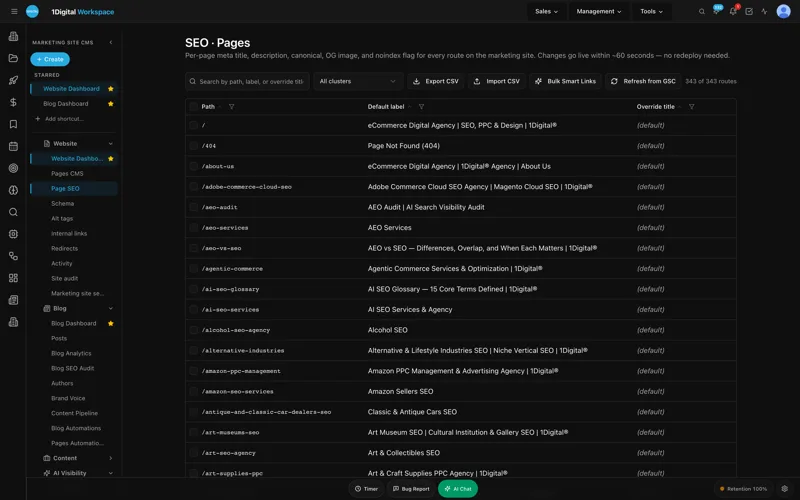
Step two is where you build the proposal queue your design team actually wants. But you cannot get there if you scare them off at step one. Workspace CMS templates default to short forms, and field-level controls let you A/B which step-two fields are required versus optional. The Page Editor's SEO Sidebar means every service-area page that wraps a form also carries its own meta title, description, and canonical without bouncing between screens - important when you are spinning up "Outdoor kitchen quotes in Sandy Springs" the night before a paid push.
UNLIMITED MANAGED CHANGES
Send a ticket. We ship the change.
Every Workspace CMS plan includes unlimited managed CMS edits. Essentials ships in 4 business days. Growth ships in 2. Premium ships in 12–24 hours. No per-edit fees. No "open a Jira" overhead. Every spring-rush landing page, every new neighborhood service-area page, every before/after gallery update from last weekend's install - describe what you need and our team builds it on your live site.
See the workflow in a 20-minute demo →
3. You have no clear service-area map (Atlanta vs perimeter vs OTP)
If you serve Atlanta, you know the conversation: "Do you come out to Alpharetta?" "How about Lawrenceville?" "We are in East Cobb, is that too far?" Every one of those calls is a homeowner who could not figure out from your website whether you serve them. Many more never call. They just bounce.
Three things need to be obvious within ten seconds:
- A visual map or clean list grouping cities by zone: ITP (Buckhead, Midtown, Virginia-Highland, Druid Hills), perimeter belt (Brookhaven, Sandy Springs, Decatur, East Cobb), and OTP (Marietta, Roswell, Alpharetta, Johns Creek, Lawrenceville).
- Honest pricing language per zone if you charge differently for travel. "OTP installs include a $250 mobilization fee" beats a surprise on the proposal.
- Per-neighborhood landing pages for the top five neighborhoods you actually want more work in. "Patio installation in Buckhead" should resolve to a Buckhead patio page, not your generic services page.
Workspace CMS's Multi-Location Storefront was built for exactly this. Define your service zones once, attach portfolio projects to the neighborhoods they happened in, and the platform generates the zone-map widget, the per-zone landing pages, and canonical tags so you do not get hit for duplicate content. A homeowner in Roswell sees Roswell patios and Roswell trip-cost language; a homeowner in Decatur sees Decatur work. The same project does not get re-uploaded - the storefront filters by tag.
When spring rush hits and you need "March patio availability in Decatur" live by Friday, you do not wait on a developer. Most landscaping marketing agency engagements stall here - the agency took six weeks to launch the site and now wants two more to add a neighborhood page. The managed-change workflow compresses that to a ticket, a 2-day SLA, and a live page.

4. No LocalBusiness schema means you are invisible to the 3-pack
This is the leak nobody talks about because it is invisible from the front end. Google's local 3-pack is largely fed by structured data. If your site has no JSON-LD LocalBusiness schema, no Service schema per offering, and no areaServed arrays for your zones, you are asking Google to figure out who you are from prose and a footer address.
The Workspace CMS Structured Data Editor with live JSON-LD validation is the simplest version of this we have used. It gives you a fielded editor for LocalBusiness with the right Schema.org type for landscape contractors, areaServed arrays you can populate from your zone list (Buckhead, Sandy Springs, Decatur, Marietta, Roswell, Alpharetta, Johns Creek), and a Service schema generator for each offering - flagstone patio, retaining wall, sod install, irrigation. Validation runs before publish so a typo never ships.
Two more pieces of the SEO suite earn their keep on landscape sites:
- Redirect Manager with conflict detection- portfolio URL restructures will happen the first time you reorganize by project type. Conflict detection catches the loops before they hit production. It has saved us twice during gallery migrations.
- Site Speed and Core Web Vitals- nightly Lighthouse-grade scoring catches the day a 4MB hero photo lands in the install gallery and tanks LCP. We get the email at 6 a.m., compress the image, redeploy by 9.
What to look for in a landscaping website designer (and what to avoid)
Most homeowners searching for a landscaper web design agency end up with one of three options: a freelancer on Squarespace, a generic small-business agency on WordPress with twelve plugins, or a specialist studio with a managed platform behind it. Each one breaks differently.
The freelance Squarespace build looks fine on launch day and then ages badly - no schema editor, no redirect manager, no way to spin up neighborhood pages without copy-pasting templates. The WordPress agency build works until a plugin update breaks the form, the SEO plugin and the cache plugin disagree, and nobody is on call. The specialist studio with a managed platform is the only one that ships a March landing page in 48 hours during spring rush.
What we look for when we hire a landscaping website designer to take over a competitor's site:
- A real editor for SEO at the page level, not a plugin sidebar that fights the page builder.
- An AI Blog Generator tuned to brand voice so seasonal posts ("When to overseed Fescue in Atlanta," "Bermuda dormancy and February cleanups") can ship weekly without burning a designer's afternoon.
- Automations that pre-build the spring-rush landing page set on a schedule, not a panic Tuesday in February.
- A unified Analytics screen pulling GA4 and Google Search Console together so you see traffic and ranking on one view.
- Same-week turnaround on managed changes. If a lawn care website company quotes you two weeks to add a page, they are not your partner during March.
Workspace CMS bundles all of the above behind the per-tenant admin. You can read the full feature inventory on the marketing site, or scroll the live demo gallery to see other trade sites built on the same platform.
Which Workspace CMS tier actually fits a landscaping company
Workspace CMS has three tiers and landscaping companies almost always belong on the middle one:
- Essentials - $89/month: Self-managed. Full SEO control suite, AI Blog Generator, Structured Data Editor, sitemap, robots.txt, and llms.txt editors, plus a 4-business-day SLA on managed changes. Right tier if your office manager is comfortable in a CMS and edits the site a few times a quarter.
- Growth - $199/month: Managed by the 1Digital team. Unlimited content edits, image swaps, locations, and blog posts with a 2-business-day SLA and same-business-day blocker SLA. Spring rush hits and you need new patio installation landing pages live, neighborhood pages updated, and last week's hardscape photos in the portfolio by Friday. You send a ticket; they ship the change.
- Premium - $449/month: White-glove with a 12–24 hour change SLA and a daily AI Site Audit. Right for multi-location operators running paid campaigns across more than three metros.
For a single-market hardscape contractor doing $1M–$4M in revenue, Growth is the fit. Seasonal velocity alone justifies the step up - you are shipping new neighborhood pages, new install photos, and new seasonal blog posts every week from February through October. Side-by-side numbers live on the pricing page.
Landscaping Company Website Quote Form CMS: What a FAQ
How long does it take to launch a new landscaping site on Workspace CMS?
Most clients launch in two weeks. That includes portfolio migration with category tagging, service-area map setup via the Multi-Location Storefront, quote form integration, and LocalBusiness plus Service schema for your primary service zones.
Can I keep my existing domain and Google rankings?
Yes. The Redirect Manager with conflict detection is built for this. Before launch, the team maps every existing URL to its new home, sets up 301 redirects, validates the chain, and CSV-imports the full map so you do not lose link equity.
What about Google Business Profile and reviews?
On the Growth tier, Google reviews are built in - they sync to your site and you can reply from your dashboard, all coordinated with what is happening on the site so a new patio install hits the portfolio and a fresh review lands on the page in the same week.
Do I need to know anything technical to update the site?
No. No HTML required. On Growth, you mostly send tickets - "swap the hero photo to the Druid Hills patio install" - and the change ships. The Page Editor with rich-text and the SEO Sidebar is what your office manager uses day to day when they want to make a small edit themselves.
Will my site show up in AI search results like ChatGPT and Perplexity?
That is the AEO side of the platform. The Structured Data Editor, the llms.txt editor, and the AI Visibility Tracker across ChatGPT, Claude, Perplexity, and Gemini surface your business when a homeowner asks an AI "who installs flagstone patios in Atlanta." The AI Content Audit flags gaps with one-click fixes as they appear.
What to do next
If any of the four leaks sound familiar - phone-screenshot portfolio, ten-field quote form, mystery service area, no schema - the fix is not bigger ad spend. It is a CMS that treats landscaping like the visual, local, seasonal business it is, and a partner who ships changes the same week you ask for them. Real humans on the managed side. Real AI tools in the editor. Real changes shipped fast. Schedule a working session with the Workspace CMS team and bring your current site. Twenty minutes in, you will know which leak is costing the most quotes - and what the fix looks like before March hits.